
BROKER · ACCOUNT · EXECUTION
Installing MetaTrader does not tell you who holds your account
The platform is the interface used to view prices and send instructions. Your account, money, contract terms, and execution policy belong to the service provider and legal entity named in your agreement. This lesson separates those roles, shows what demo can and cannot test, and follows an instruction from Order to Deal and Position.
WHO DOES WHAT?
Four roles that must not be mixed together
Platform
Software that displays prices and charts and sends requests to the trade server; it is not the broker’s licence or the holder of client funds.
Broker / legal entity
The entity that opens the account, performs KYC, and sets the service terms. Read the agreement and execution policy to identify counterparty and routing roles.
Regulator
Oversees permissions in its jurisdiction and provides a register and complaint route; it does not guarantee that trading cannot lose money.
Venue / liquidity arrangement
Execution may use an exchange, external liquidity, or internal matching depending on product and policy.
DUE DILIGENCE
Verify the entity before comparing features
Use the regulator for the jurisdiction stated in the client agreement. Thai SEC, FCA, NFA BASIC, and ASIC are examples of official search tools—not a claim that every provider belongs to all four.

Legal entity and jurisdiction
Read the full company name in the client agreement—not just the brand—and identify the entity and jurisdiction that will hold your account.
Register, licence, and product permission
Search the licence number in the regulator’s register and confirm that the permission covers the service, product, and client type you will actually use.
Official domain and contact details
Match the website, email, and phone details against the official register to avoid clone firms. A matching name alone is not enough.
Client money and complaint route
Read the client-money arrangement, complaint body, and compensation scheme that actually applies to that entity; protections vary by jurisdiction.
Execution and withdrawal terms
Review the execution policy, costs, slippage, margin, abnormal-market clauses, funding and withdrawal terms, and account restrictions at source.
A valid permission is one part of due diligence. It does not remove market, leverage, operational, or counterparty risk.
A foreign licence does not mean the provider is authorised in Thailand. Use the Thai register only for activities within its stated scope, and never describe an overseas OTC forex/CFD provider as “approved in Thailand” without a matching Thai permission.
BROKER EXAMPLES
Exness and XM: examples Gumrai users may encounter
These names are included because Gumrai has partner links for both providers and has encountered their account environments during product testing. This is not a ranking or a claim that either provider is suitable for everyone. The legal entity, regulator, products, and protections can differ by country and account.
The account-opening buttons are sponsored partner links. Gumrai may receive compensation if you use them. Check the legal entity, terms, and risks yourself before opening an account.
Exness
MT5Before signup, identify the Exness entity shown for your residence and match it to the official regulation page. On demo, verify the server, account currency, full symbol name or suffix, XAUUSD contract, spread, execution mode, and trading sessions.
Check Exness legal entitiesXM
MT5Confirm the XM legal entity and licence displayed during registration rather than relying on the brand name alone. On demo, check server, account type, full symbol name, contract size, minimum volume, execution mode, spread, swap, and sessions.
Check XM legal informationDEMO ≠ LIVE
Use demo to practise—not to prove live results
| Area | Demo | Live |
|---|---|---|
| Money and consequences | Virtual funds for learning the workflow and testing rules. | Real money; profit, loss, fees, and mistakes have real consequences. |
| Platform functions | Generally provides comparable charts, orders, and platform tools. | Uses the live account’s permissions, server, and contract specifications. |
| Liquidity and fills | Useful for observing basic behaviour, but does not prove live fills or liquidity. | May experience slippage, requotes, partial fills, or rejection under live conditions and policy. |
| Spread and costs | May look similar, but does not guarantee stressed-market or news-time costs. | Depends on live quotes, account type, market conditions, and actual fees. |
| Funding and psychology | Does not test real withdrawals or the pressure of money that can actually be lost. | Includes real KYC/funding processes and psychological pressure that demo cannot reproduce. |
ACCOUNT HYGIENE
Server, symbol, and password are part of the setup
Server
Select the account’s correct server. Demo and live may use different servers and expose different symbols or specifications.
Symbol suffix
Check the full name such as EURUSDc or XAUUSD.m and open that symbol’s Specification rather than inferring from the base name.
Passwords
The master password can trade; the investor password is view-only. Never expose account numbers, passwords, or server details publicly.
ORDER ROUTING
Follow the instruction through the system
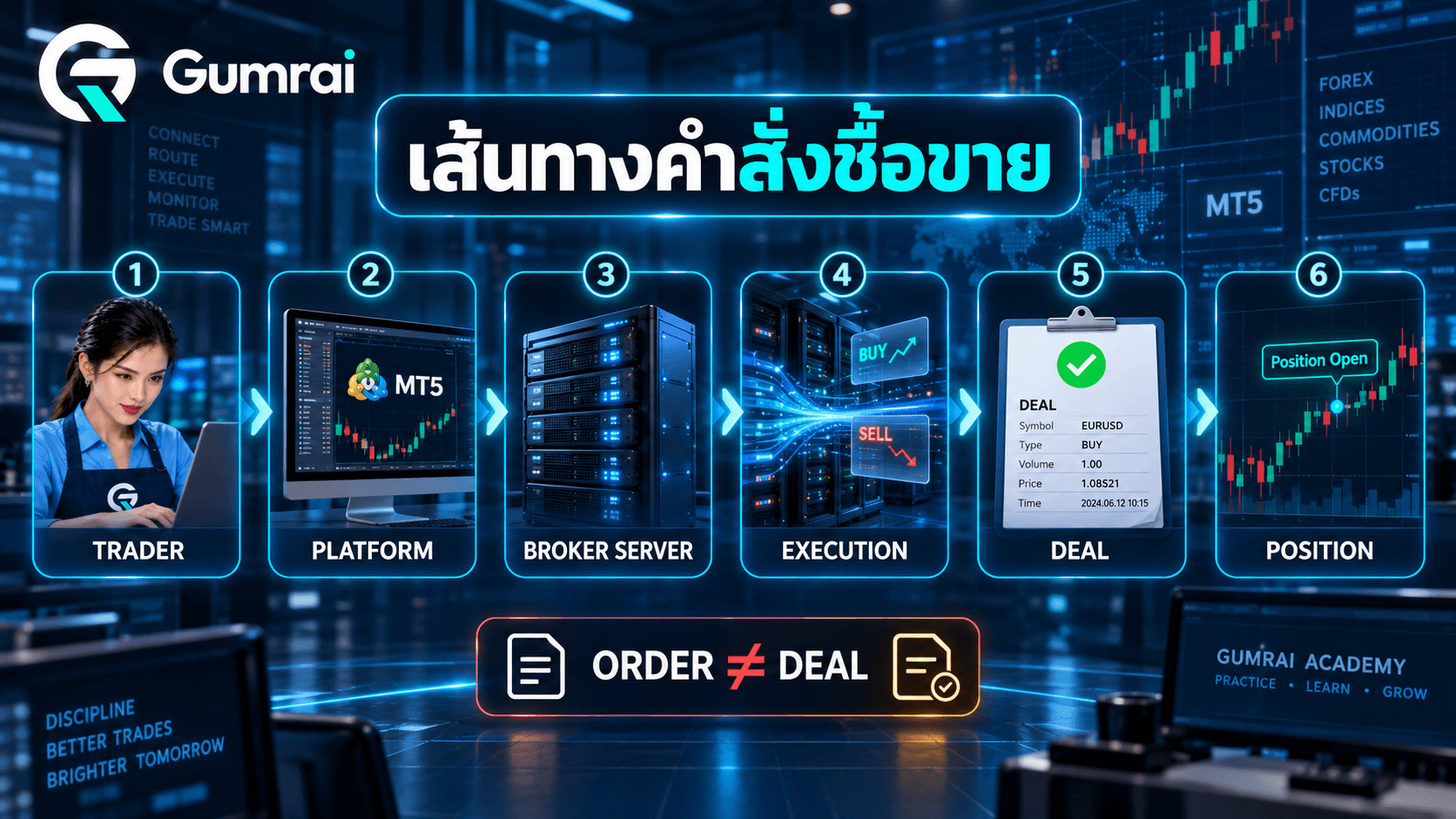
Trader
Selects symbol, volume, type, and SL/TP
Platform
Builds and sends the trade request
Broker server
Checks account, margin, price, stops, and permission
Execution path
Handles the request under mode, venue, and liquidity rules
Deal(s)
Records one or more executed transactions
Position
Opens, increases, reduces, or closes exposure
Order
The instruction sent to the system; it is not proof of execution.
Deal
An executed transaction. One Order can generate multiple Deals when filled in parts.
Position
Open exposure created by Deals and represented under the account’s netting or hedging system.
Netting
Deals on the same symbol are reflected in one net Position. New Deals can increase, reduce, reverse, or close that net exposure.
Hedging
The account can hold multiple separate Positions on the same symbol, including opposite directions when the provider and account permit it.
EXECUTION MODES
The symbol and provider determine the available mode
Request Execution
A price is requested and then confirmed; an expired quote may require a new request.
Instant Execution
Sends an order at the requested price with allowed deviation; a larger move may result in a requote.
Market Execution
The provider fills at an available price; the user accepts that the fill may differ from the pre-click quote.
Exchange Execution
The order is handled under the rules of the connected exchange or external trading system.
Fill policies describe what happens when the requested volume cannot be filled as requested. Fill or Kill requires the full allowed volume; Immediate or Cancel fills the available part and cancels the remainder; Book or Cancel applies to eligible pending-limit behaviour. The provider and symbol determine what is available.
Market vs Pending: A market order requests execution now; a pending order waits for a stated condition. Lesson 5 covers Limit, Stop, and Stop Limit placement in detail.
WHY ORDERS DIFFER
A button press is a request, not a guaranteed fill
- Market closed or trading disabled for the symbol
- Insufficient margin or invalid volume/step
- Stops violate the minimum-distance rule
- No suitable quote or price change causes a requote
- Insufficient liquidity causes a partial fill under the fill policy
- Requested and filled prices differ as slippage
CONTROLLED DEMO TEST
Log execution behaviour across 10–20 orders
Use one symbol, small demo volume, and repeatable conditions. The goal is to understand the workflow—not to maximise demo profit.
| Time / session | Symbol | Spread | Requested | Filled | Slippage | Result / error |
|---|---|---|---|---|---|---|
| — | — | — | — | — | — | — |
| — | — | — | — | — | — | — |
| — | — | — | — | — | — | — |
GUMRAI TOOLS
Test the intended market and account setup first
GUMRAI ORB VX EA
Designed for XAUUSD on M15. Verify the full symbol name, suffix, contract specification, execution mode, spread, and trading session on demo first.
GUMRAI DUO FX
Designed for EURUSD, USDJPY, USDCAD, and AUDUSD—not gold, indices, or crypto. Verify each broker-specific symbol and account condition on demo.
Compatibility checks reduce setup errors; they do not guarantee profit or remove trading risk.
HANDS-ON PRACTICE
Verify the account and execution yourself
1Choose one provider and find its legal entity, licence number, regulator, and domain in an official register.View answerHide answer
2Open a demo account and record the server, account type, symbol suffix, and execution mode for two symbols.View answerHide answer
3Place one small demo order and identify the Order, Deal, and Position in History/Toolbox.View answerHide answer
4Run 10–20 controlled demo orders and log session time, spread, requested price, fill price, slippage, and any errors.View answerHide answer
5Check ORB VX EA or DUO FX readiness on demo without exposing an account number or password.View answerHide answer
KNOWLEDGE CHECK
Three questions with explanations
1. If a company name appears in a register, is that enough to prove the website you opened belongs to that company?
- A) Yes, because the names match
- B) No; match the entity, licence, product permission, domain, and contact details
- C) Yes, if it has many followers
Open explanationHide explanation
2. A demo account makes money for 20 consecutive trades. What does that prove most reliably?
- A) The system will make the same profit live
- B) The broker has no slippage
- C) You practised the workflow and collected a sample, but did not prove live execution or future results
Open explanationHide explanation
3. Which relationship between Order, Deal, and Position is correct?
- A) They are three names for the same thing
- B) An Order is an instruction, a Deal is an execution, and Deals open, change, or close a Position
- C) A Position always exists before an Order
Open explanationHide explanation
SUMMARY
Five ideas to keep
- 1The platform is an order interface, not proof of who holds funds or acts as counterparty.
- 2Verify the legal entity, licence, permissions, domain, and service documents at official sources.
- 3Demo trains workflow and logic but cannot prove live fills, liquidity, withdrawals, or future results.
- 4An Order is an instruction, a Deal is an execution, and Deals change Positions.
- 5Execution mode, fill policy, symbol suffix, and Specification must be checked on the actual account.
For education only—not investment advice, a broker recommendation, or a trading signal. Leveraged forex and CFD products can cause rapid losses. Regulation and demo testing do not remove market, operational, or counterparty risk.
VERIFIED OFFICIAL SOURCES
Sources checked for this lesson
References are collected here so the lesson stays readable without citation numbers after every paragraph.
- MetaTrader 5 Help — Open an Account
- MetaTrader 5 Help — Connect to an Account
- MetaTrader 5 Help — Basic Principles: Order, Deal and Position
- MetaTrader 5 Help — Executing Trades and execution modes
- MetaTrader 5 Help — Depth of Market
- Thai SEC — Licensed-company search
- FCA — How to check a firm or individual is authorised
- NFA — BASIC registration and disciplinary-history search
- NFA — Investor advisory: conducting due diligence
- ASIC — Professional Registers Search
- Exness — Regulation and legal entities
- XM — Regulation and legal information