
PRICE LANGUAGE
The screen shows 1.08526—but what does each digit mean?
A price is more than a moving number. It tells you what is being priced, which side of the quote your order uses, how finely the platform displays it, and which contract rules turn a price move into money. This lesson separates those ideas so you do not treat pips, points, and ticks as interchangeable.
BASE / QUOTE
Read the pair from left to right
EURUSD = 1.08526
EUR is the base currency. USD is the quote currency. One euro is priced at 1.08526 US dollars.
USDJPY = 154.200
USD is the base currency. JPY is the quote currency. One US dollar is priced at 154.200 yen.
When the quote currency is not your account currency, the platform may need another conversion before profit or loss appears in the account currency. Do not assume a JPY result is already a USD result.
BID / ASK / SPREAD
Buying and selling use different sides of the quote
BID
Open Sell · Close Buy
ASK
Open Buy · Close Sell
Many OTC symbols draw charts from Bid by default, but the actual chart mode is a symbol property. A Sell position closes on Ask, which may sit above the visible Bid chart by the spread. This is why a Sell stop can trigger even when the Bid candle appears not to have touched that level. Verify Chart mode in Specification and enable the Ask line when needed.
DIGITS · POINT · PIP · TICK
Four ideas that sound similar but do different jobs
Digits & Point
Digits is the number of displayed decimals. Point is the value of the smallest displayed digit; for example, Digits = 5 gives Point = 0.00001.
Pip & Pipette
Pip is an FX distance convention, commonly the fourth decimal for most pairs and the second for JPY pairs. One additional fractional digit is commonly called a pipette.
Tick Size
The actual tradable price step. It may equal one Point or span several Points; read it from Specification.
Tick Value
The monetary value of one tick under the contract specification. It must be considered together with Volume and the calculation currency.
REFERENCE TABLE
Which values are conventions—and which must be checked?
| Term | What it measures | Unit | Where to verify |
|---|---|---|---|
| Base currency | The first currency—the one unit being priced. | Currency unit | FX quote convention |
| Quote currency | The second currency, showing how much is needed for one unit of the base. | Currency unit | FX quote convention |
| Bid / Ask | The trader’s sell-side / buy-side quote. | Price | Live provider quote |
| Spread | The difference Ask − Bid. | Price or points | Varies with quote and provider |
| Digits | The number of decimal places displayed. | Count | Specification |
| Point | The value of the smallest displayed price digit. | Price unit | SYMBOL_POINT / Specification |
| Pip / pipette | An FX distance convention / one tenth of a pip. | FX distance unit | Depends on FX quote format |
| Tick size / Tick value | Tradable price step / monetary value of one price step. | Price / currency | Contract- and provider-specific |
WORKED EXAMPLES
Convert price distance step by step
EURUSD · 5 digits
Assume Point = 0.00001 and the usual 1 pip = 0.0001 convention. Price moves from 1.08526 to 1.08616.
0.00090 ÷ 0.0001 = 9 pips
USDJPY · 3 digits
Assume Point = 0.001 and the usual 1 pip = 0.01 convention. Price moves from 154.200 to 154.285.
0.085 ÷ 0.01 = 8.5 pips
These examples measure distance only. They do not calculate money. Monetary profit or loss still depends on contract properties, trade volume, and currency conversion.
MT5 SYMBOL SPECIFICATION
Read the actual contract before using any unit
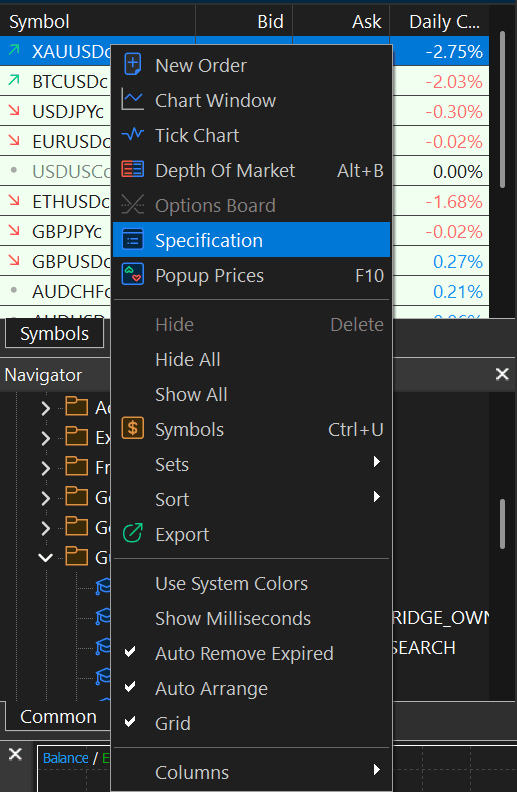
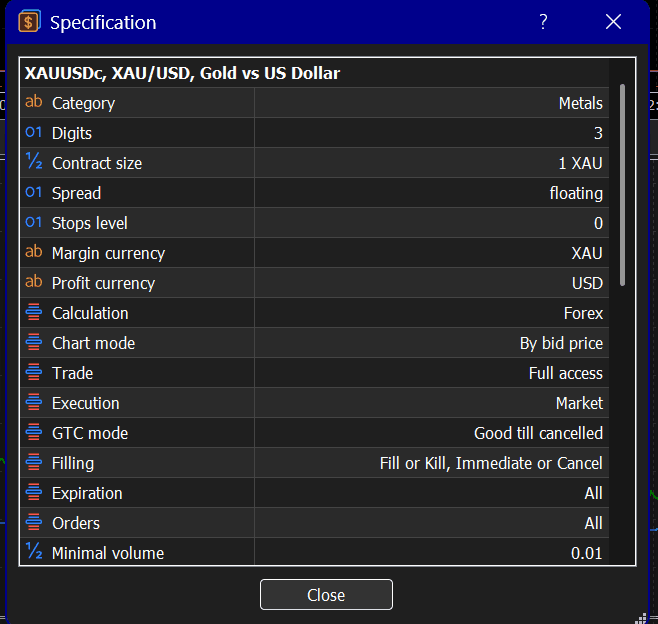
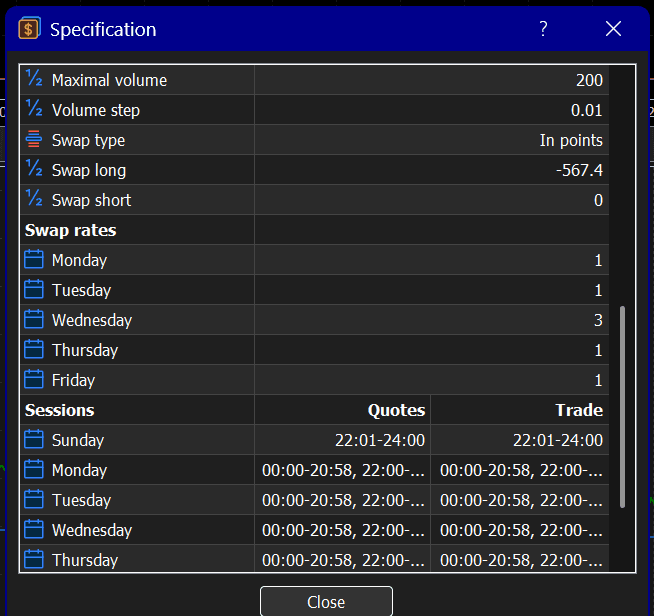
In Market Watch, right-click a symbol and choose Specification. The screenshot below is a real XAUUSDc example supplied for this lesson. It is evidence of one provider/account configuration at the capture time—not a universal XAUUSD standard.
XAUUSD · US30 · BTCUSD
Do not import a fixed contract value from another provider
XAUUSDCheck Digits, Point, Tick Size, Tick Value, Contract Size, Profit Currency, and Calculation mode in the live account. The symbol name alone does not establish ounces per lot.
US30The name may reference the same index, while multiplier, price-step value, trading sessions, and minimum volume differ.
BTCUSDVerify the instrument type, Contract Size, Profit Currency, trading sessions, and overnight financing terms.
MONEY VALUE
The same number of points can produce different money
Price distance is only one input. Contract Size defines exposure, Tick Size defines the tradable step, Tick Value connects that step to money, Volume scales the position, and currency conversion maps the result into the account currency.
Estimated money move = Number of ticks × Tick Value × Volume
Use the platform’s current profit calculator or order preview where available; the simple formula may need currency conversion and provider-specific calculation rules.
BEFORE YOU TRADE
Specification checklist
- Digits & Point
- Tick Size & Tick Value
- Contract Size
- Profit & Margin Currency
- Spread & Chart Mode
- Stops Level
- Minimum Volume & Volume Step
- Calculation & Execution Mode
- Trading Sessions
- Swap / Financing
COMMON ERRORS
Mistakes that distort risk calculations
- Calling points “pips” without checking Digits and the pair’s quote convention.
- Using the word pip for gold, indices, or crypto and inferring money from the label.
- Watching only the Bid chart and forgetting that a Sell closes on Ask.
- Assuming the same symbol name has the same Contract Size everywhere.
- Converting price distance directly into money without Tick Value, Volume, and account currency.
HANDS-ON PRACTICE
Open Market Watch and verify the values yourself
1Open EURUSD in Market Watch and record its live Bid, Ask, Spread, Digits, and Point.View answerHide answer
2Open USDJPY and express a 0.085 price move in points and pips.View answerHide answer
3Open XAUUSD Specification and record Digits, Point, Tick Size, Tick Value, Contract Size, and Profit Currency.View answerHide answer
4Compare US30 across two providers or account types and identify which specifications differ.View answerHide answer
5Open BTCUSD and explain why “a 100-point move” is not enough to state monetary profit or loss.View answerHide answer
KNOWLEDGE CHECK
Three questions with explanations
1. EURUSD shows Bid 1.08524 and Ask 1.08526. If a Buy is opened and immediately closed with no quote change, which prices are used?
- A) Open at Bid and close at Ask
- B) Open at Ask and close at Bid
- C) Open and close at Last
Open explanationHide explanation
2. If Digits = 5 and price moves 0.00090, what is the distance under the usual non-JPY FX convention?
- A) 9 points and 90 pips
- B) 90 points and 9 pips
- C) 900 points and 0.9 pip
Open explanationHide explanation
3. Which information is required before calculating the monetary value of an XAUUSD move?
- A) Digits alone
- B) The symbol name alone
- C) Tick Size, Tick Value, Contract Size, Volume, and the relevant currencies
Open explanationHide explanation
SUMMARY
Five ideas to keep
- 1Base is what is being priced; Quote is the unit used to express that price.
- 2Buy opens at Ask and closes at Bid; Sell opens at Bid and closes at Ask; Spread is the difference.
- 3Digits and Point describe display precision; pip is an FX quote convention.
- 4Tick Size and Tick Value are contract properties and need not equal Point or pip.
- 5Before calculating money, open the live account’s Specification and include Contract Size, Volume, and currencies.
For education only—not investment advice or a trading signal. Leveraged products can produce rapid losses. Verify the current contract terms in your own platform and practise on a demo account before risking real money.
VERIFIED OFFICIAL SOURCES
Sources checked for this lesson
References are collected here so the lesson stays readable without citation numbers after every paragraph.